
Affiliate disclosure: This guide contains affiliate links. As an Amazon Associate, we earn from qualifying purchases at no extra cost to you. Learn more.
2026-05-30
Affiliate disclosure: This guide contains affiliate links. As an Amazon Associate, we earn from qualifying purchases at no extra cost to you. Learn more.
A retro handheld can easily last you years, but its lithium battery will not — unless you treat it well. The cell inside your device is a consumable that degrades with time, heat, and how you charge it. A few simple habits dramatically slow that decline, keep runtimes long, and avoid the safety risk of a swollen battery.
This guide is about keeping a battery healthy, not picking a device with a big one — for that, see our best handhelds for battery life buyer's guide. Here we cover how lithium cells age, the charging and storage habits that matter, and what to do when a battery reaches the end of its life.
How Lithium Batteries Age
Almost every retro handheld uses a lithium-ion or lithium-polymer (LiPo) pouch cell. Three things wear it out:
- Charge cycles. Every full 0–100% charge is roughly one cycle, and a cell is typically rated for a few hundred cycles before noticeable capacity loss. Partial charges count proportionally — two 50% top-ups equal about one cycle.
- Heat. Heat is the single biggest enemy of battery longevity. Charging while playing a demanding game, or leaving the device in a hot car or in direct sun, accelerates wear permanently.
- Voltage stress at the extremes. Sitting at a full 100% charge or draining all the way to 0% both stress the cell. Lithium batteries are happiest spending their life in the middle of their range.
Capacity loss is gradual and normal. The goal is to slow it, not stop it.
Charging Habits That Actually Matter
You do not need to obsess, but these habits meaningfully extend battery life:
- Avoid full discharges. Recharge before the device hits 0%. Repeatedly running it flat is one of the fastest ways to wear a cell. Top up around the 20–30% mark.
- Do not leave it sitting at 100% for days. Unplug once charged rather than leaving it on the charger indefinitely. If your firmware offers a charge limit (some Android handhelds and the Steam Deck do), capping at 80–90% is great for longevity.
- Keep it cool while charging. Charge on a hard surface, not a bed or couch that traps heat, and avoid playing graphically heavy games while charging if the device gets warm.
- Use a sensible charger. A quality 5V/USB-C charger or a moderate-wattage PD charger is fine. You do not need the highest-wattage brick you own — extreme fast-charging generates more heat.
The single highest-impact habit is simply not letting the battery live at 0% or 100%. Day-to-day, charge it to mostly-full and unplug.
Storing a Handheld Long Term
Putting a device away for weeks or months? Lithium cells should not be stored full or empty.
- Charge to roughly 50% before storing. This is the sweet spot that minimizes aging while idle.
- Store somewhere cool and dry. Avoid hot attics, garages, and windowsills.
- Top it back up every few months. A cell left to self-discharge to 0% over a long storage period can be permanently damaged or refuse to charge again.
This matters for collectors with several handhelds — the ones you are not actively using should be parked at about half charge, not left full or run dead.
Bypass / Passthrough Charging
Some handhelds support bypass charging (also called passthrough), where the device runs directly from the wall while plugged in instead of charging and discharging the battery at the same time. This reduces heat and cycle wear during long sessions docked to a TV or charger. If your device and firmware support it, it is worth enabling for stationary play.
Safety: Spotting a Swollen Battery
A swelling battery is the one issue you must not ignore. As lithium cells fail, they can build up gas and physically expand. Warning signs:
- The back cover or screen bulges, lifts, or no longer sits flush.
- A creaking shell, or buttons/triggers that suddenly feel tight.
- The device gets unusually hot, or battery life collapses suddenly.
If you suspect swelling, stop using and stop charging the device immediately. A swollen lithium cell is a fire and rupture hazard. Do not puncture it, do not press on it. Power the device down, keep it somewhere away from flammable material, and replace or properly recycle the battery. Never throw a lithium battery in household trash — take it to an electronics or battery recycling drop-off.
Replacing the Battery
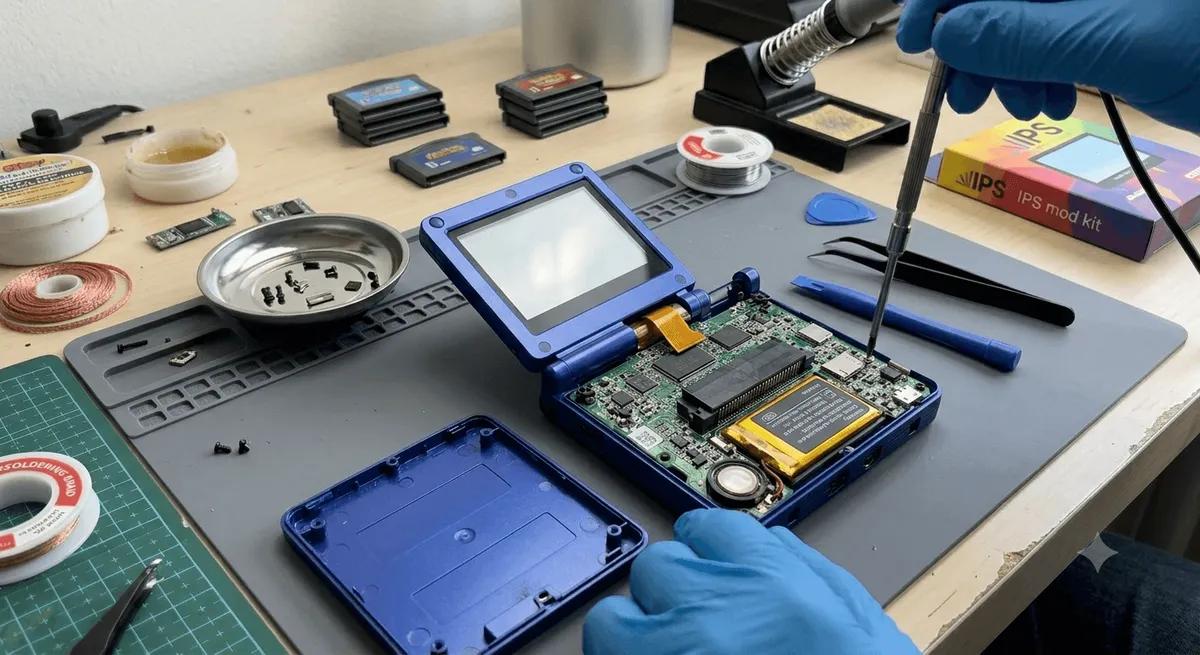
The upside of most retro handhelds: the battery is a standard LiPo pouch cell and is often user-replaceable with basic tools. A fresh cell restores full runtime for a fraction of the cost of a new device.
What to know before you replace:
- Match the cell. Replacements are specified by capacity (mAh) and physical dimensions, and they use a small connector. Order one made for your exact model, or match the printed capacity and connector on the original.
- Tools. You will usually need a precision screwdriver kit and plastic pry tools to open the shell.
- Handle gently. Disconnect the old cell carefully, never pry on the cell body, and recycle the old one.
If you want to track how your battery is performing — actual capacity, charge wattage, and runtime — a cheap inline USB power meter is a handy tool.
Quick Reference
- Charge to mostly-full, unplug; do not park at 100% for days.
- Recharge before 0%; never run it flat repeatedly.
- Keep it cool — heat is the real killer.
- Store long term at ~50% in a cool place, top up every few months.
- Stop using any device with a swollen battery and recycle it safely.
Related Guides
Related reading
 GuideGuideGuide